
Tag: Design/UX

  • 8 Technology Trends Ministries Should Be Paying Attention To

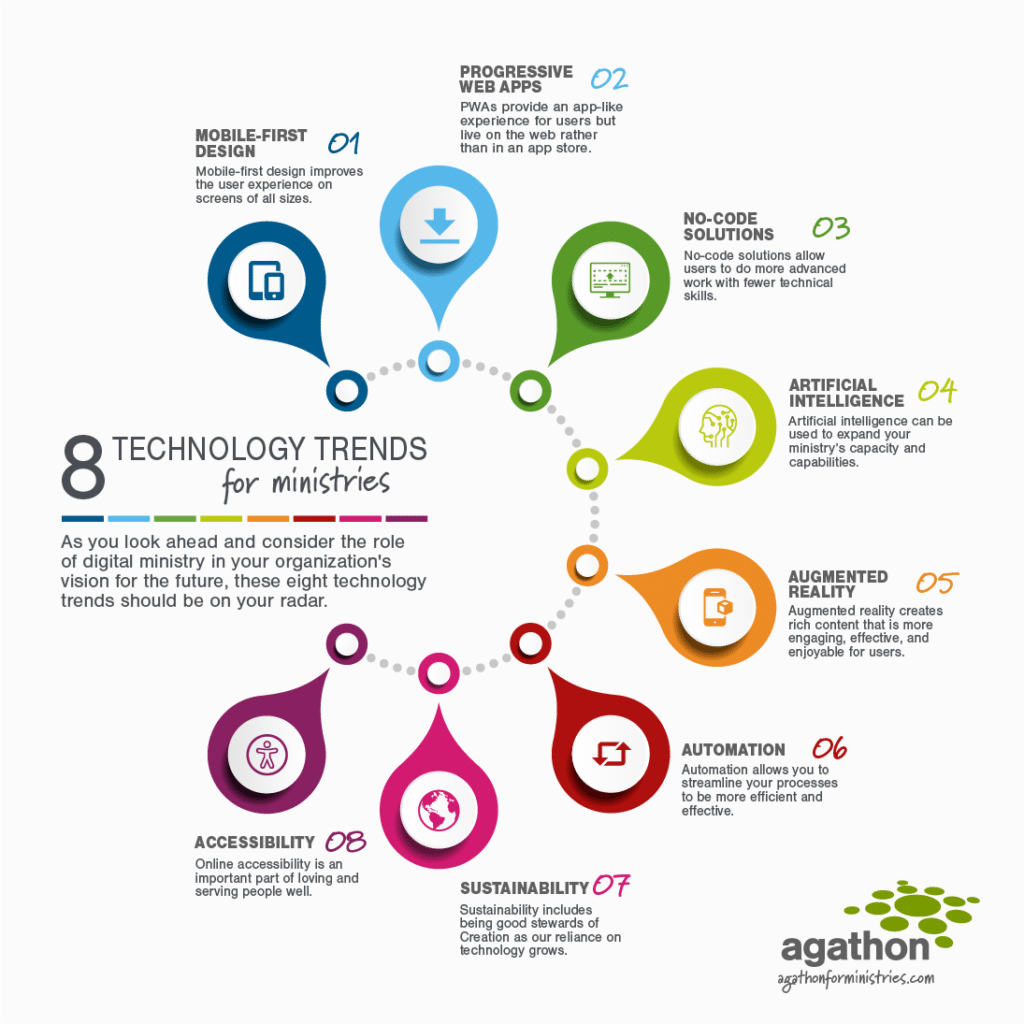
    A colorful infographic highlighting 8 technology trends for ministries with the caption: As you look ahead and consider the role of digital ministry in your organization's vision for the future, these eight technology trends should be on your radar.

    In 1965, Gordon Moore posited that the number of transistors per microchip would double every year. While this prediction has changed over time, it continues to guide forecasts for hardware development. Hardware isn’t our specialty here at Agathon. But it’s easy to see how we can extrapolate Moore’s Law to the advancements in software as well. Just consider the technology available to most home users 30 years ago, 10 years ago, and today.

    For ministries, the past few years meant the accelerated adoption of much of this technology even further due to the challenges and opportunities presented by the COVID-19 pandemic.

    As you look ahead and consider the role of digital ministry in your organization’s vision for the future, we’ve identified eight technology trends that should be on your radar. This is not a call to implement every one of these today. Rather, it’s an opportunity to begin thinking about which ones might impact your ministry in the future.

    Table of Contents
    1. Mobile-First Design
    2. Progressive Web Apps
    3. No-Code Solutions
    4. Artificial Intelligence
    5. Augmented Reality
    6. Automation
    7. Sustainability
    8. Accessibility
    Mobile-first design improves the user experience on screens of all sizes.

    1. Mobile-First Design

    Mobile-first design is a design philosophy that aims to create better experiences for users by starting the design process from the smallest of screens: mobile.

    What does mobile-first design mean for digital designers? Inside Design

    A few years ago we would have called this section “responsive web design.” We knew mobile was important, but it was still secondary to desktop.

    But as the use of smartphones and tablets has become ubiquitous, we’ve realized a responsive design isn’t enough. Instead, it makes sense to design websites for the smallest screen first. Many features that improve the mobile experience—lots of whitespace, large tap targets, etc.—are also beneficial on larger screens.

    This hasn’t always been realistic, especially for ministries working with tight budgets. In the past, web and mobile technologies were decidedly separate and would need two separate development projects. Today, tools such as React and Flutter allow developers to code for several platforms at once. This makes it easier for you to build mobile first while still stretching your digital ministry budget.

    This “write once, deploy everywhere” approach is also beneficial for the teams working on these products. It allows a single team member to service many technologies and creates redundancy across larger teams.

    [contentupgrade id=”2406″]

    PWAs provide an app-like experience for users but live on the web rather than in an app store.

    2. Progressive Web Apps (PWA)

    Progressive Web Apps use modern web capabilities to deliver an app-like user experience. They evolve from pages in browser tabs to immersive, top-level apps, maintaining the web’s low friction at every moment.

    Getting Started with Progressive Web Apps, Google Developers

    While we’re on the topic of mobile, it makes sense to consider progressive web apps (PWAs) as well. PWAs are websites that function like apps on desktop or mobile. These aren’t for simple informational websites but for interactive tools, account management, or internal applications.

    Native apps can be expensive, time consuming to update, and are subject to various app store rules, while creators have complete control over their PWAs. Like a traditional app, users can download PWAs to the home screen of their phone or tablet. And they function like a native app. They also allow push notifications and function better with poor internet. Plus, there are no app store fees to pay. And because they’re built on the web, you can update the content in real time.

    Because there is no central marketplace for PWAs, the app store may still be the answer for public-facing apps. Internal applications, on the other hand, should always function as PWAs. Similarly, apps that are paying exorbitant fees, or those that receive constant updates, may do better as PWAs. And ministries concerned about censorship or the rules governing their app may also find PWAs to be the right solution.
    No-code solutions allow users to do more advanced work with fewer technical skills.

    3. No-Code Solutions

    A no code development platform is a tool for building software applications without coding; a popular and promising alternative to traditional software development for non-technical business users hoping to build their own full-fledged applications.

    What is no code? Codebots

    No-code solutions are around us already: WordPress plugins add functionality with one click; tools such as Airtable or Zapier optimize your communication, processes, and workflow; and website builders like Webflow and SquareSpace allow you to quickly build a site without technical skills.

    The terminology itself can be confusing. “No code” doesn’t mean there is no need for human involvement at all. Rather, these platforms often function through a drag-and-drop interface. This helps team members to do more advanced work with fewer technical skills. Which, of course, allows your ministry to accomplish more with fewer resources and a lower learning curve.

    Does that mean agencies like Agathon will no longer be needed in the future? We sure hope not! Developers will continue to be on the leading edge of these advances. And as good as no-code solutions have become, they aren’t the solution to every problem. We will continue to augment internal teams and guide organizations with strategy and user experience tools to help them best serve their users.
    Artificial intelligence can be used to expand your ministry’s capacity and capabilities.

    4. Artificial Intelligence

    Artificial intelligence leverages computers and machines to mimic the problem-solving and decision-making capabilities of the human mind.

    What is Artificial Intelligence, IBM

    When we hear artificial intelligence (AI), we often jump right to the sci-fi idea of robots taking over the world. But that reality is a lot further off than most people imagine. However, AI in its current form can be a useful tool for the work of most organizations.

    In fact, you’re probably using AI already in your daily work. Think of things like your phone or email’s autocomplete feature, Grammarly’s writing feedback, or your bank’s transaction verification tools. AI is increasingly integrated in our everyday life, and it’s not going anywhere.

    Although there may come a day when ministries build their own AI, you can begin by taking advantage of existing tools now. For example, Answer The Public helps organizations understand what users are searching for on the internet. There are numerous programs that help create blog posts and other content. Tools such as Tableau help organizations jumpstart their reporting efforts by identifying anomalies and reporting against data. And others can help predict or forecast what’s to come based on data trends.

    This type of artificial intelligence helps ministries expand their capacity and capabilities, augmenting their current staff rather than replacing them.
    Augmented reality creates rich content that is more engaging, effective & enjoyable for users.

    5. Augmented Reality

    Virtual reality and augmented reality accomplish two very different things in two very different ways, despite their devices’ similar designs. VR replaces reality, taking you somewhere else. AR adds to reality, projecting information on top of what you’re already seeing.

    Augmented Reality (AR) vs. Virtual Reality (VR): What’s the Difference? PCMag

    Like, AI, virtual reality (VR) and augmented reality (AR) may bring to mind the most extreme examples of these technologies such as “attending” church from home through a virtual reality headset.

    Actually, augmented reality is much more accessible. It can be used, for example, to add interactivity to visual content, whether in-person or digital. (Many of us are familiar with the Pokemon Go craze of a couple of years ago!) This type of rich content is more engaging and can increase both the effectiveness and the appeal for users.

    Imagine the groundbreaking for a new facility, where people can hold up their phones to see an artist’s rendition of the building. Or picture the Bible Project videos brought to life in your living room. Imagine helping your donors experience the sights and sounds of the communities they’re supporting. Or envision online study tools that feel almost like real books and Bibles. It’s hard to anticipate all the ways this technology will be used in the years to come. But you should expect to see many of these ideas brought to life!
    Automation allows you to streamline your processes to be more efficient and effective.

    6. Automation

    The dictionary defines automation as “the technique of making an apparatus, a process, or a system operate automatically.” We define automation as “the creation and application of technology to monitor and control the production and delivery of products and services.”

    What is Automation? ISA

    Automation in general is not a new trend; however, it’s application to digital ministry will continue to increase over time as tools and best practices develop:

    Marketing automation

    You’re probably already familiar with marketing automation: a welcome series for new newsletter subscribers, a drip campaign during fundraising drives, or a tool to manage and schedule your social media messages.

    As this technology advances, you will be able to do even more to personalize the experience of your key stakeholders—whether donors or constituents—based on their demographics and the actions they take.

    Business process automation

    Marketing automation allows you to reach out more efficiently and effectively; business process automation helps you streamline your workflows internally. This includes things like a customer service workflow to help agents route and respond to emails. But it could also include time tracking tools, integrations to streamline data entry, etc.

    Test automation

    Finally, since we’re talking about digital ministry, it’s worth including test automation within this section. Whether developing software or publishing content, every human action creates an opportunity for error. Test automation can reduce friction and human error by scheduling and making processes predictable, automating things such as accessibility check-ins, and facilitating security checks for accountability.
    Sustainability includes being good stewards of creation as our reliance on technology grows.

    7. Sustainability

    Sustainable practices support ecological, human, and economic health and vitality. Sustainability presumes that resources are finite, and should be used conservatively and wisely with a view to long-term priorities and consequences of the ways in which resources are used. In simplest terms, sustainability is about our children and our grandchildren, and the world we will leave them.

    What is sustainability? UCLA Sustainability

    Tech trends often compete with the more human side of ministry. Or, if they don’t compete, they certainly present tradeoffs. We’ve seen this acutely in the last two years: Zoom and other digital platforms provided a way for churches to meet their congregants’ needs during pandemic lockdowns. But this remote access also presented challenges in reconnecting communities as lockdowns ended.

    Sustainability might seem like a strange topic to include on a list of trends. In reality, your ministry cannot ignore the growing importance of sustainability as a whole.

    John Elkington coined the phrase “triple bottom line” as a sustainability framework to measure an organization’s economic, social, and environmental impact. To simplify it in the context of ministries, a sustainable organization will:

    • care for both the people they serve and the people who serve
    • responsibly manage donations and expenses
    • be a good steward of creation

    Sustainability for ministries

    In the context of digital ministry, there are real implications of understanding the energy usage of your systems, websites, and apps. You may not have control over the infrastructure or bandwidth powering your tools. But understanding your site’s consumption and how you can offset that allows you to work toward a more sustainable future.

    For example, there are tools that will tell you what type of resources your site requires just to load. They can even go so far as to make recommendations (e.g., white screens use more energy to render than dark screens) and help you understand the implications of various design decisions.

    While sustainability is a bit nebulous to define, being good stewards of people, planet, and profit (or donations) is likely to become more important—not less—as time passes.
    Online accessibility is an important part of loving and serving people well.

    8. Accessibility

    Web accessibility is the inclusive practice of ensuring there are no barriers that prevent interaction with, or access to, websites on the World Wide Web by people with physical disabilities, situational disabilities, and socio-economic restrictions on bandwidth and speed. When sites are correctly designed, developed and edited, generally all users have equal access to information and functionality.

    Web accessibility, Wikipedia

    At Agathon, we believe accessibility is an important part of loving and serving people well. We also believe accessibility is good for everyone.

    Accessibility impacts:

    • Your ability to provide services,
    • How you connect with supporters and donors,
    • Whether your digital ministry feels welcoming, and
    • How well you can spread awareness of the work you’re doing.

    This is no longer something you can ignore or put off for tomorrow; the importance of building accessible websites and apps is only going to increase.


    It’s unlikely your organization will dive into all of these trends at once. But an important part of setting your ministry’s digital strategy is understanding the big picture trends and envisioning how those might help you to be more effective in ministry.


  • 5 Reasons Web Accessibility Matters for Ministries

    5 Reasons Web Accessibility Matters for Ministries

    A white handicap parking symbol on a blue background

    It’s 2021, and web accessibility is no longer a “nice to have” feature of your website or mobile app. By now, we know how poorly designed software impacts users with a variety of limitations or disabilities. And ongoing court decisions show the expansion of the Americans with Disabilities Act (ADA) to include online accessibility is coming sooner rather than later.

    But for ministries, avoiding litigation isn’t the primary reason you should be thinking about accessibility on your digital properties. We firmly believe loving and serving people well means accounting for these needs as you’re building websites and apps. We’d even go so far as to say ignoring these needs deliberately snubs those who need accommodations and harms the gospel message.

    We’ll dive deeper into why accessibility is important to your ministry plus some easy steps for improving accessibility. But first, let’s talk about what web accessibility means.

    What is Web Accessibility?

    Web accessibility is the inclusive practice of ensuring there are no barriers that prevent interaction with, or access to, websites on the World Wide Web by people with physical disabilities, situational disabilities, and socio-economic restrictions on bandwidth and speed. When sites are correctly designed, developed and edited, generally all users have equal access to information and functionality.

    Wikipedia

    As humans, our skills, abilities, and intellect cover a wide spectrum. Small type on a page or highly animated websites work for those toward the middle of the spectrum. But they can pose challenges for those with visual or cognitive disabilities. Similarly, users who rely on screen readers can struggle to navigate a site that isn’t properly built for this technology, making the content impossible to access.

    If your ministry is delivering services or content digitally, accessibility simply can’t be ignored. It’s easy to think your site is performing just fine if you’re not hearing from people otherwise; however, it could be people are simply clicking away in search of those resources elsewhere. In this way, you may be creating an echo chamber of the average person while ignoring the needs of those outside the average.

    Areas to consider for web accessibility

    There are five primary areas of impairments to consider for web accessibility:

    • Visual—a loss of vision beyond what can be corrected by glasses or contacts, including blindness, loss of central or peripheral vision, blurriness, light sensitivity, haziness, color blindness, etc.
    • Auditory—the partial or total inability to hear, whether constant or fluctuating, including deafness, tinnitus, trouble hearing specific frequencies, sounds that are muffled, soft, or too loud, etc.
    • Neurological—conditions impacting the brain or nervous system, including autism, epilepsy, migraines, etc. that may be exacerbated by visual or audio stimulation.
    • Cognitive—conditions that impact how people process and comprehend information, including ADHD, mental health disorders, dementia, learning disabilities, etc.
    • Motor—weakness or limitation in motor skills or muscular control, including tics or tremors, amputation, arthritis, carpal tunnel syndrome, etc.

    Web accessibility guidelines

    To help address these areas, the Web Accessibility Initiative has published the Web Content Accessibility Guidelines (WCAG). These guidelines are the leading authority on accessibility and are organized around four principles:

    Perceivable: Can users perceive the content? Just because something is perceivable with one sense, such as sight, doesn’t mean all users can perceive it.

    Operable:
    Can users use UI components and navigate the content? For example, someone who can’t use a mouse or touch screen cannot operate something that requires a hover interaction.

    Understandable:
    Can users understand the content? Can users understand the interface and is it consistent enough to avoid confusion?

    Robust:
    Can a wide variety of user agents (browsers) consume the content? Does it work with assistive technology?

    These principles, and the accompanying questions, can help guide the accessibility conversation as you look for practical ways to make your site more accessible.

    A woman in a yellow blouse sitting in a wheel chair at a table while using her laptop

    The 5 Reasons Accessibility Matters for Your Digital Ministry

    Loving and serving people well includes building accessible digital properties. But let’s dive deeper into the other reasons accessibility matters for your ministry:

    1. It’s necessary for providing services

    If you’re serving people through content, services, or tools on your site, it’s imperative those be accessible to the people who need them. Here are three questions to ask yourself:

    Can users engage with the content? For broadcast ministries, such as Truth For Life, the content is their ministry. Video captions, transcripts, and easy-to-use video and audio players remove barriers for the vision- or hearing-impaired as well as an older audience that may not be as proficient with technology.

    Can users interact with the services? Similarly, if your ministry is offering teaching, counseling, online small groups, or other services, how accessible are those services? They should be easy to navigate. Buttons and other interactive elements should function on a variety of screens. This includes creating target areas that are easy for people to click regardless of their device.

    Can users request assistance? If your ministry provides tools and resources—for example, a ministry that facilitates housing for an at-risk group—the process should be accessible for those with special use cases. The instructions and workflow should be easy to understand and navigate. Forms, applications, and other resources should work with screen readers or when the screen is zoomed.

    2. It allows you to connect with supporters and donors

    In addition to facilitating your ministry, an accessible site also helps you connect with supporters and donors. Many nonprofit ministry organizations rely on volunteering and donations. Accessibility concerns can create barriers for those who want to support the work you’re doing.

    Incorporating third-party tools such as a volunteer management app is one way to ensure the tools on your site are accessible. Similarly, accessible forms facilitate donations. This means providing clear instructions, labeling and validating form fields, and providing clear success and error notifications.

    3. It creates a welcoming environment

    While it’s almost certainly not your intention, when you ignore accessibility concerns, it projects the idea that you’re not interested in serving or partnering with those with special needs. If you haven’t added captions to videos, formatted pages to work correctly with a screen reader, or made the font size and contrast easy to read, you’re turning away people who need those accommodations.

    And the opposite is true as well: paying attention to accessibility concerns and incorporating those into your user interface (UI) tells visitors your ministry values people from across the spectrum. Which leads us to number four…

    4. It helps spread awareness of your ministry

    When your tools are accessible, the people who need those accommodations can and will share them with others in their communities. Rather than narrowing your appeal to those with average abilities, you widen your circle. This opens the door for more people to benefit from and partner with you in your work.

    5. It’s better for everyone

    And finally, accessibility truly is better for everyone. The tools we rely on for accessibility don’t only enhance the experience for those who need them; they make websites and apps more usable for everyone.

    For example, a focus on readability might include a larger font; lots of white space; short, left-aligned paragraphs; high contrast; etc. Those accommodations make the content accessible to those with visual or cognitive impairments. But they also make the reading experience more pleasant for everyone, preventing eye strain and enabling skimming.

    Investing in accessibility can feel like a sunk cost that may or may not reach additional people. But when it’s done right, you’re serving all of your users. So how do we do this?

    A young man with down syndrome sitting on a bed wearing headphones and using his laptop

    3 Ways to Improve Your Web or Mobile App’s Accessibility

    The good news is there are easy ways to make your web or mobile app more accessible. Just like the needs we’re addressing, accessibility is a spectrum. Each step you take to make your site more accessible moves you forward toward this goal.

    The WCAG define three positive ratings: A (the very minimum you should strive for) to AAA (perfect accessibility). Realistically, the painstaking work required to reach an AAA rating means many sites won’t see the benefit of seeking this top-tier rating. But if you aim to start at A or AA and continue to iterate as new technology and practices become available, you’ll be serving your users well.

    1. Use HTML the way it’s meant to be used

    HTML is inherently good for accessibility. When you use HTML properly, the structure and tags enable your site to be accessible. This includes telling screen readers how to progress through the content and labeling different elements appropriately.

    Your first step is to make sure you’re using HTML the way it’s supposed to be used. You can do this by auditing your existing digital properties via automated tools or by hiring a consultant. As you’re building new features or properties, there are also tools that will audit as you build and at the testing stage.

    2. Ensure keyboard friendliness

    Once you’ve verified your HTML structure, you can test this by attempting to navigate your website with just your keyboard. This helps you experience the site in the same way people using assistive technologies do. When you get stuck, either because tab takes you to a different place than you were expecting or you can’t access a button with your keyboard, you’ll know where improvements are needed.

    3. Build for responsiveness and zooming

    Responsive web design and mobile-first development are good for SEO, usability, and accessibility. They naturally include generous button sizes, touch functions, and accommodations for browser squashing.

    To test your site’s responsiveness, zoom in using the keyboard (CTRL-+ on PC and ⌘-+ on Mac) and see if things break. Are elements where they’re meant to be? Is all of the content still on the screen? Are you needing to scroll in unexpected places?

    Start with the three items above and you’re well on your way towards a more accessible and welcoming site.


    When it comes to accessibility, the perfect truly is the enemy of the good. Trying to overhaul everything to reach an accessibility goal is understandably overwhelming. But that shouldn’t stop you from making beneficial changes right away. Start today by asking yourself how accessible your site is right now and how you could realistically improve. And then push yourself to go just a little bit further to serve more people!

  • Building an Accessible Web

    Building an Accessible Web

    Hanging accessibility signs for the WC (bathroom)

    The internet is built on the notion that information should be accessible, shareable, and open. The information superhighway connects us with people and ideas at an unprecedented rate. As technology advances, building an accessible web depends on our vigilant effort to build sites and apps that enable everyone to connect with the resources available.

    What is accessibility?

    In the context of a website or app, accessibility refers to technology that enables all users to interact with the content, with special attention for those with a disability.

    If you’re living without a disability, it can be easy to forget there are many people who use technology in a very different way than you. For some users, this means navigating with software that reads the navigation and content to them. For others, it means navigating without a mouse or touchpad, or without being able to hear. When we build accessible websites and apps, we build in a way that supports these different use cases.

    Glasses with clear frames sitting on the edge of a laptop

    Why should we care about building an accessible web?

    It may be tempting to think that just because the majority of your users don’t use assistive technology or interfaces, there isn’t much benefit to building your site or app with those minority users in mind.

    However, accessibility is becoming a standard, not an afterthought, and we believe it’s worth pursuing now for several reasons:

    Accessibility benefits everyone

    Web accessibility is essential for people with disabilities and useful for all.

    https://www.w3.org/WAI/perspective-videos

    An accessible web makes everyone’s experience better. Accessibility ensures sites are still usable when CSS fails to load. It also keeps video content relevant even with the sound off and increases the readability of content in less-than-ideal lighting conditions. And it allows users to use their keyboard to navigate the site, often much quicker than they can with their mouse or touchpad.

    Accessibility is good for SEO

    Accessibility improves navigability and usability not just for disabled people but for everyone, and it can be tremendously beneficial for SEO (Vox).

    When we build with accessibility in mind, we fuel SEO content with relevant information. If the site and content makes sense for assistive technology, it will also make sense to the machines at Google, Microsoft, and Yahoo.

    Accessibility is the law

    The number of website accessibility lawsuits … filed in federal court under Title III of the ADA exploded in 2018 to at least 2258 – increasing by 177% from 814 such lawsuits in 2017 (ADA Title III).

    If you operate a physical place of business, you’re well aware of the implications the Americans with Disabilities Act (ADA) has had on your business. However, many businesses aren’t aware of how this legislation affects their online presence. Beyond user experience, lack of accessibility could expose your organization to legal risk.

    A laptop screen showing CSS code being edited

    What can I do to increase accessibility?

    The ADA itself doesn’t provide measurable criteria for what it considers accessible. However, we can take cues from how others have been measured in the courts. This is where the Web Accessibility Initiative (WAI) comes in. The WAI’s guidelines—the Web Content Accessibility Guidelines (WCAG)—lay out measurable ways to accommodate users with a disability.

    If your organization interfaces with the federal government, you should also be familiar with Section 508. These laws outline the success criteria for building accessible sites that are used by the government.

    Making sure your site, app, and content are accessible can feel overwhelming. The WAI is a great place to start. There you’ll find tools and references for both content creators and developers. These will walk you through how to evaluate your current technology. The Web Accessibility eValuation Tool (WAVE) can also help you assess your current site for potential issues.

    In our experience, there are several quick fixes that can have an immediate impact on the accessibility of your site or app:

    • Add alt attributes to img elements
    • Add Skip to content links near the top of the page
    • Use heading tags (H1, H2, etc.)
    • Adjust contrast for text

    However, while some of the items on this list may be easy to address, it only scratches the surface of what building an accessible web entails. Beyond the quick fixes, the WCAG covers a wide range of considerations; you may need to work with a developer to get your site or app up to current accessibility standards.


    Accessibility standards change alongside changing technology, and it can be overwhelming for organizations to keep up with these. We’d love to help you assess your technology and build a game plan for meeting the criteria today and moving forward!

  • Five Signs It’s Time to Redesign Your UX

    The digital experience you offer your users should be central to your organization’s strategy. And this is true whether you primarily share free content or offer products and services for sale. Because the internet and the way people interact with it are always changing, redesigning your user experience (UX) over time is inevitable. And knowing when to invest the time, effort, and resources into redesigning your UX should be a calculated endeavor.

    Here are 5 considerations that might indicate it’s time to redesign your UX:

    1. Brand growth

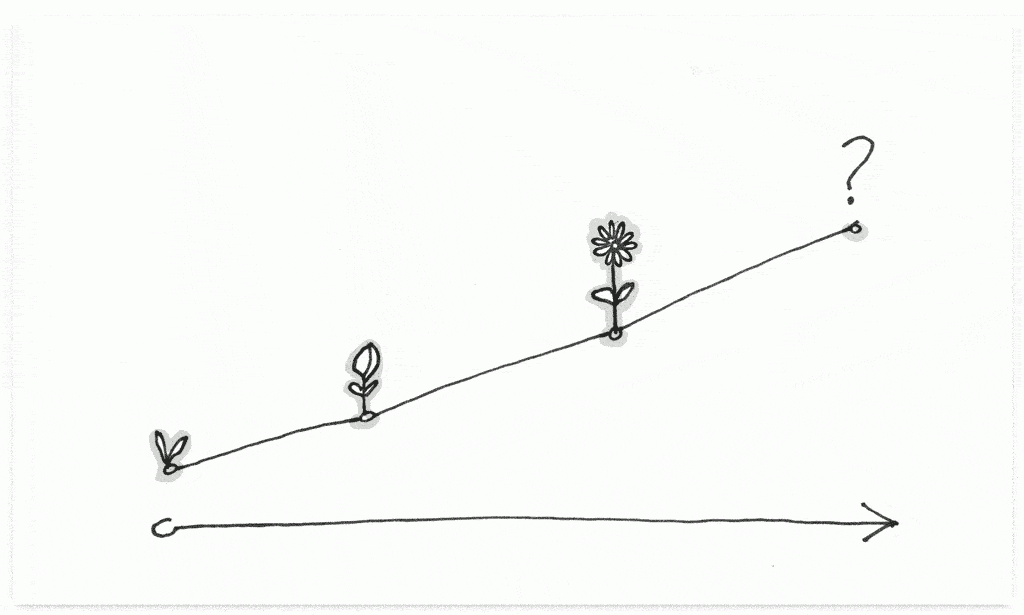
    Illustration of a growth chart with a seedling, bud, flower, and question mark along the growth line

    Your brand grows and responds to cultural shifts, new technology, and organizational focus. For example, there has been a dramatic increase in the number of organizations adopting a humanitarian or sustainability focus as a key part of their brand over the last 15 years.

    Whether your organization is mission-driven or a traditional business, the same principles apply. Brand growth informs how you present and communicate your brand to users. And this has an outsized impact on the digital experience you offer them. These milestone in your brand’s evolution are often drivers of new organizational capabilities, new narratives to share with the world, and a new user experience to support it all.

    2. Performance erosion

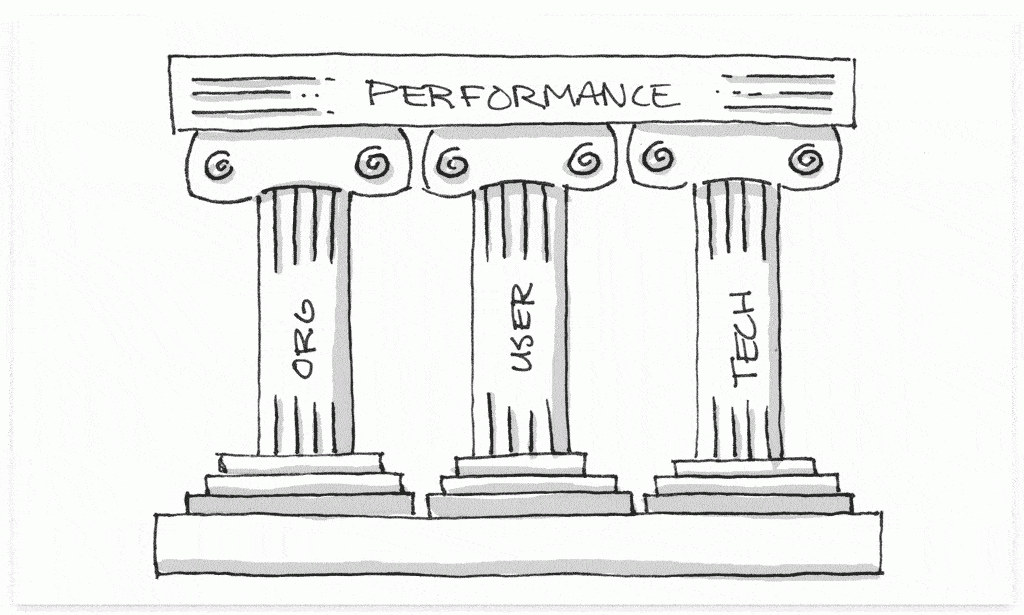
    Illustration of three pillars— organization, user, technology—holding up performance

    You can evaluate your users’ digital experiences through 3 lenses. Any (or all) of these lenses might be a catalyst to redesign your UX:

    Organizational performance

    • Does the UX support our organizational goals? (i.e., Does it facilitate the interactions that impact how we measure the health of the organization?)
    • How can we get more return on investment from the UX? (i.e., Can we move users closer to taking the desired action?)

    User experience performance

    • Does the UX meet the user in the right place, at the right time, and in the right way? (i.e., Does ubiquitous connectivity and mobile context change the types of goals we reach for in UX?)
    • Have there been broader changes in the way users interact with technology that impact the UX? (i.e., Can voice assistance, artificial intelligence, location awareness, or virtual reality improve the UX?)

    Technical performance

    • Are there development changes we could make that would improve the UX? (i.e., How can we speed up the delivery of new features, while reducing the number of bug fixes?)
    • Have technical capabilities increased to the point where a technical change could increase the quality of the UX? (i.e., Can we take fuller advantage of browser capabilities or mobile apps?)

    3. Feature alignment

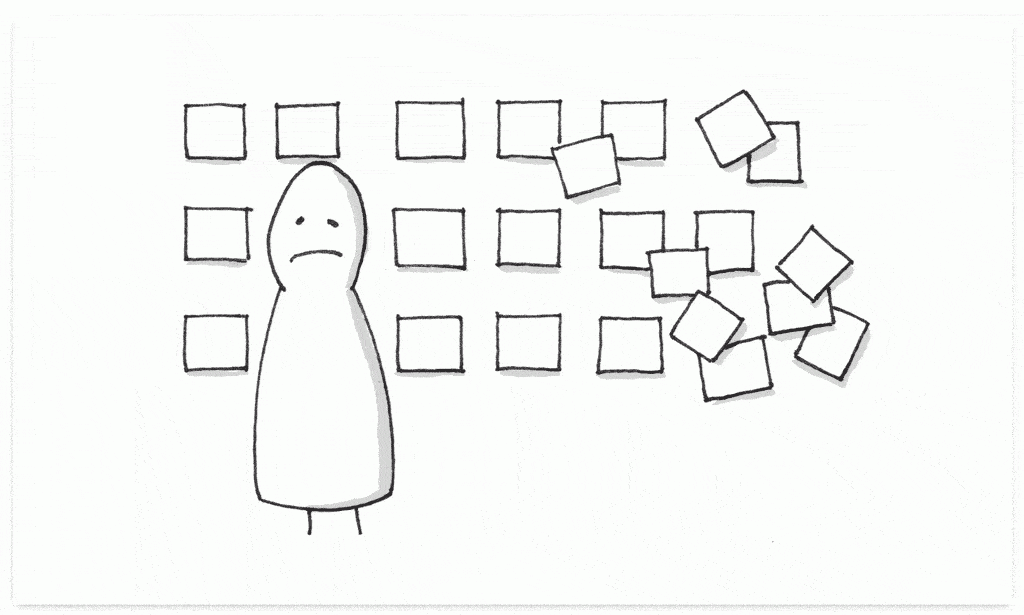
    Illustration of an abstract person with a frown standing in front of squares that represent features—they start out organized on the left side and become chaotic and scattered on the right

    Sites and apps add new features to the UX over time. These new features get bolted onto the preexisting interface, often without evaluating how new features impact the old ones. Users are grateful for the new features, but before long the UX becomes complicated and hard to navigate.

    Growth naturally requires pruning now and then. It requires time to zoom out, reassess how the features align with your users, and make tough choices about how to prioritize the experience.

    4. Difficulty of updates

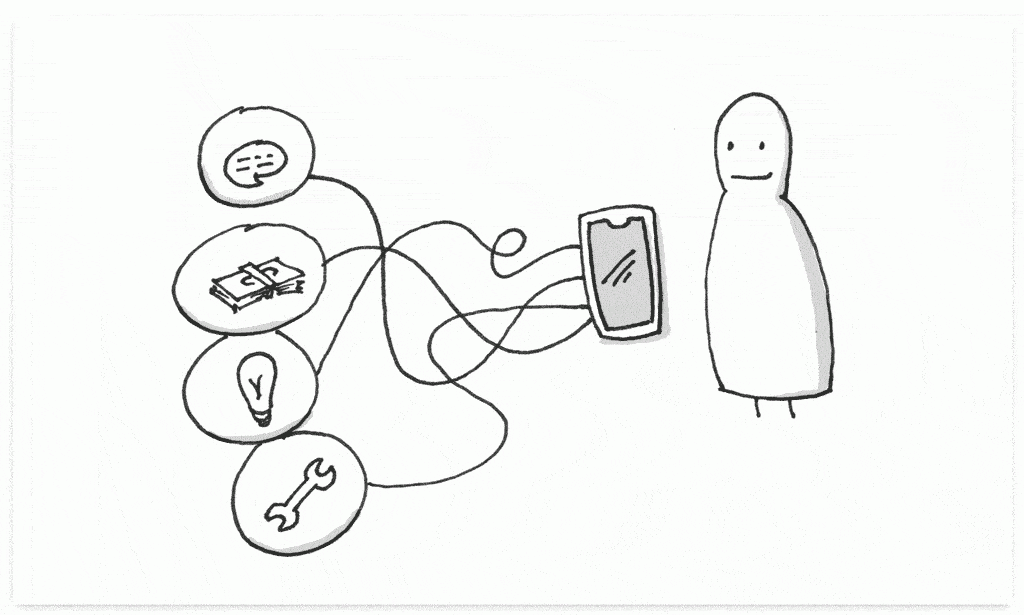
    Illustration of an abstract person with a smile looking at a phone with tangled wires leading to four thought bubbles: a chat bubble, a stack of money, a lightbulb, and a wrench.

    Updates often become difficult for two reasons:

    1. As new products or different types of content become available, these changes can be tricky to integrate with the current experience. This can be due to a limitation of the technology or the current user interface itself.
    2. As your company facilitates more organizational capabilities digitally, the integrations with user-facing technologies become more complex.

    Updating content and features doesn’t happen as often as it should when it becomes difficult. It’s important to step back and evaluate ways to streamline the update process so users have more and better access to the services they expect.

    5. User expectations

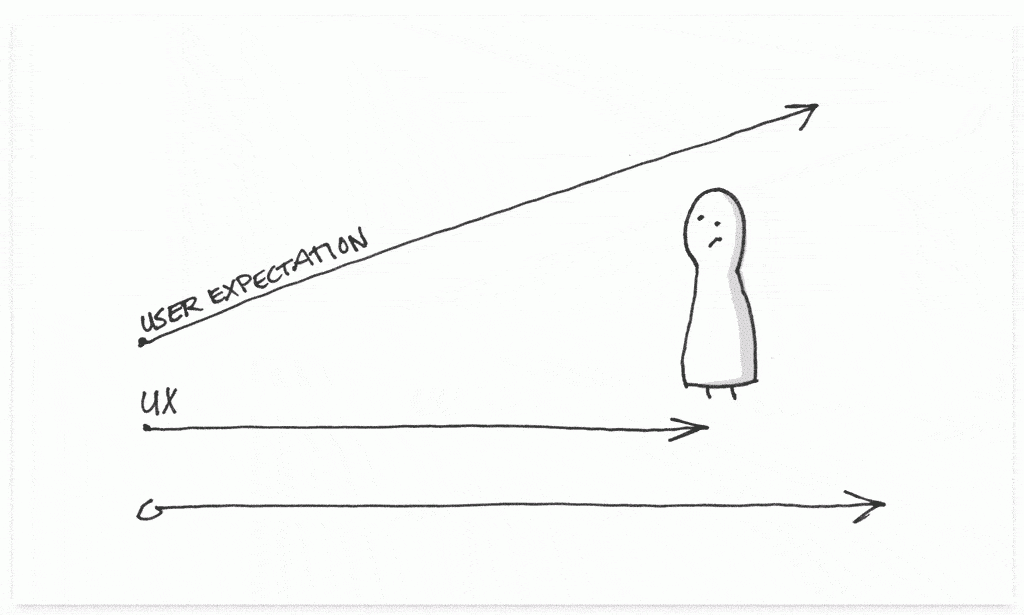
    Illustration of an abstract person with a confused expression looking at a growth chart that shows UX running along the bottom and user expectations trending up and to the right

    As users become more digitally savvy—which isn’t to say that they’re not already—they want more access to organizational capabilities. Users want to be able to access information when and where they want to, to be able to self-service common tasks, and to have more transparency when it comes to their involvement with an organization.

    These expectations grow over time, which requires organizations to build new tools to facilitate new experiences, perform new functions, and reduce friction.


    An effective UX aligns the needs of the user with organizational priorities and technical capabilities.

    Every line of code is a commitment to the future. This goes beyond security updates and technology upgrades. The user experience is built on top of code. As your organization grows, performance erodes, features come and go, updates become harder, and user expectations change over time, the UX must grow and change along with those expectations.